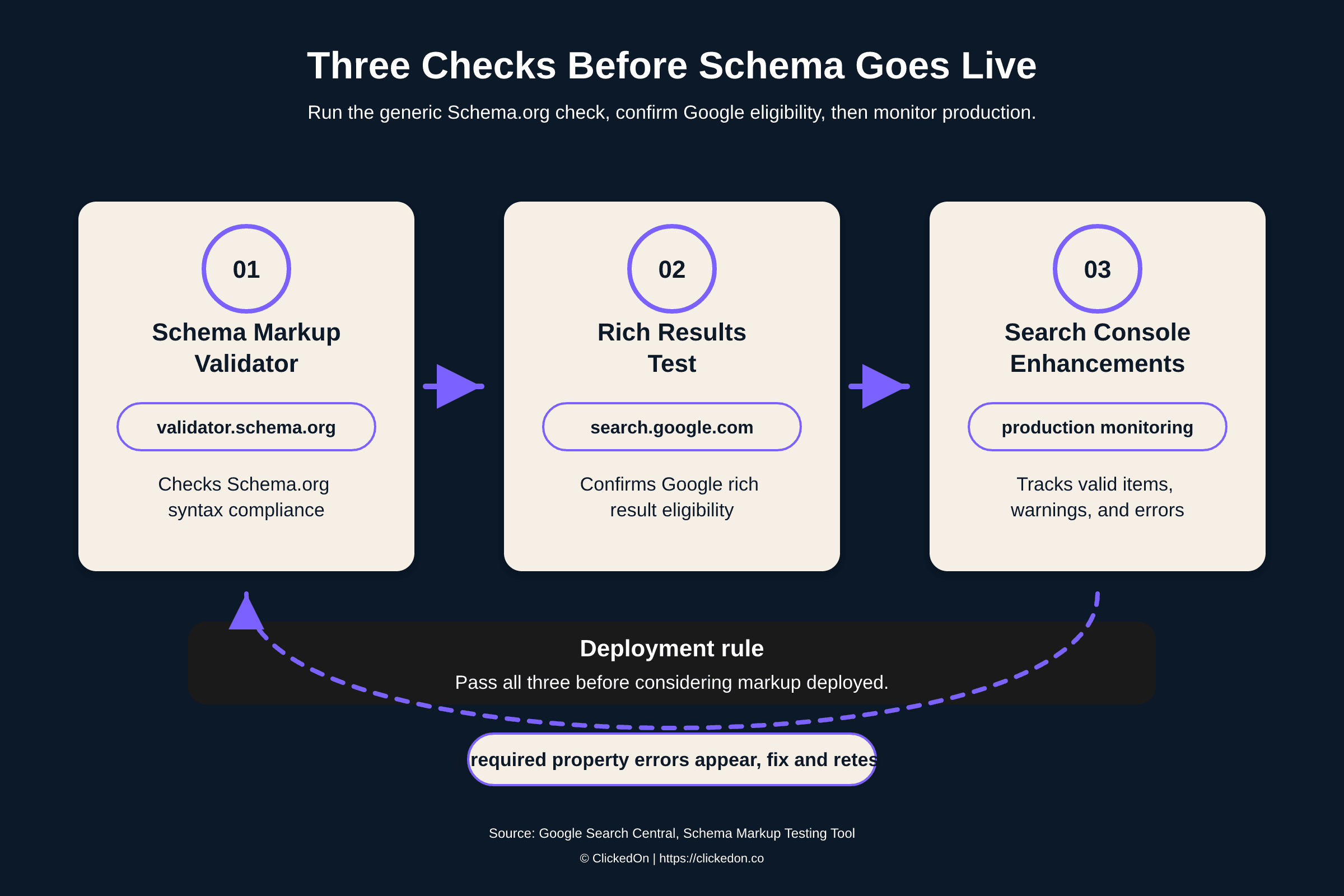
There is no single schema validator. Google points to two official tools that answer two different questions. The Schema Markup Validator (validator.schema.org) checks markup against the Schema.org standard, while the Rich Results Test (search.google.com/test/rich-results) checks whether Google can build rich results from it. Run both, in that order, then watch the Enhancement reports in Google Search Console once the page is live. A page can pass the first and fail the second, and that gap is where most rich result problems hide.
Schema markup fails quietly. A theme update ships, a plugin rewrites your JSON-LD, and the Product markup that has been earning review stars all year stops parsing. Nothing looks broken on the page, so nobody checks, and the stars drop out of your listings between deploys. By the time someone asks where they went, no one can say which release broke them.
Below is the checking workflow we run at ClickedOn. It covers which tool to open first, what each one catches, the errors that turn up most, and how far validation gets you with AI answer engines.

What is a schema validator?
A schema validator is a tool that checks whether the structured data markup on a page (JSON-LD, Microdata or RDFa) is correctly formed and conforms to the Schema.org standard. Google points to two official tools that split the job. The Schema Markup Validator at validator.schema.org, hosted by Schema.org, covers generic compliance. The Rich Results Test at search.google.com/test/rich-results handles Google rich result eligibility.
The split is deliberate. Google's own structured data documentation describes the Rich Results Test as the tool for seeing which Google rich results a page can generate. The Schema Markup Validator is the general check for all Schema.org markup, minus any warnings about Google features.
If you went looking for the old Structured Data Testing Tool, it's gone; Google retired it in 2020 and moved the generic checks to validator.schema.org. Nearly every free schema checker or schema tester you'll find online wraps one of these two engines, ours included.
How to validate schema markup in five steps
The short version, before the detail:
- Paste your code snippet or live URL into the Schema Markup Validator (validator.schema.org) and fix every syntax error it reports.
- Run the same page through the Rich Results Test (search.google.com/test/rich-results) and read the verdict, including the warnings.
- Fix any missing required properties, retest, and confirm the preview shows the result type you expect.
- Deploy, then request indexing in Search Console or wait for the next crawl.
- Watch the Enhancement reports in Search Console for errors across every page on the template, not only the one you tested.
One habit makes the workflow stick: test the live URL after deploy, even when the snippet passed in development. What your CMS renders in production is what Google crawls, and the two differ more often than anyone admits.
Schema validator tools compared: Schema Markup Validator vs Rich Results Test
Neither tool replaces the other, and picking a favourite misses the point. They answer different questions.
| Schema Markup Validator | Rich Results Test | |
|---|---|---|
| Core question | Is this valid Schema.org markup? | Can Google build a rich result from this page? |
| Coverage | Every Schema.org type | Only the types Google supports for rich results |
| Flags | Syntax and vocabulary problems | Missing required and recommended properties for Google features |
| Preview | No | Yes, a preview of the eligible result |
| Where it wins | Entity markup, custom types, anything outside Google's feature list | Stars, FAQs, products, anything you want displayed in Google |
| Address | validator.schema.org | search.google.com/test/rich-results |
Google's documentation tells you to start with the Rich Results Test, and if Google rich results are your only goal, follow it. We start with validator.schema.org instead, for one reason. It validates every type in your graph, including the publisher and entity markup that Google never displays but AI engines still parse. Clean up the whole graph first, then let the Rich Results Test rule on Google eligibility.
Passing validator.schema.org on its own is not passing, though, and this is the mistake we see most. Markup can be syntactically perfect while missing every property Google requires for display. A clean syntax check is the entry ticket. The Rich Results Test and Search Console decide whether the job is finished.
Reading the two results together tells you where to look. Passes validator.schema.org but fails the Rich Results Test: a Google required property is missing, so add it. Passes the Rich Results Test but throws errors in validator.schema.org: the failing block is usually a type Google ignores. That still matters if you care about entity clarity beyond Google.
The validation errors you'll actually see, and the fixes
Here is the failure we correct more than any other. Take a typical product page carrying this JSON-LD:
{ "@context": "https://schema.org", "@type": "Product", "name": "French linen throw, eucalyptus", "description": "Stonewashed linen, 170 x 130 cm.", "brand": { "@type": "Brand", "name": "Acme Home" } } validator.schema.org passes this without complaint, because every property is legal Schema.org. The Rich Results Test fails it for product snippets, because Google asks for at least one of `offers`, `review` or `aggregateRating` before product information can appear in results. The fix is one block: ```json "offers": { "@type": "Offer", "price": "89.00", "priceCurrency": "AUD", "availability": "https://schema.org/InStock" }
Retest and the error clears. Four more errors fill out most Enhancement reports:
- Currency symbols inside price. A value like "$89.00" fails the type check; keep the number bare and put the currency code in priceCurrency.
- Plain text where an enumeration belongs. "In stock" means nothing to a parser; the valid value is the URL https://schema.org/InStock.
- Dates written the Australian way. 13/07/2026 will not parse; structured data wants ISO 8601, so publish 2026-07-13.
- Markup describing things the visitor cannot see. Review stars with no visible reviews breach Google's structured data guidelines, and the risk reaches beyond the single page.

Why valid schema still shows no rich results
Both validators pass, weeks go by, nothing shows. The usual causes, roughly in the order we check them:
- The page isn't indexed yet, or Google hasn't recrawled since your fix (confirm with URL inspection in Search Console).
- A template variable renders empty in production, so the live page is missing a property staging had (verify the schema on the live URL, never the snippet alone).
- The markup is injected with JavaScript and the crawler renders a different page from your browser (the Rich Results Test on a live URL renders it the way Google does).
- The type has no rich result to show (many types, WebPage among them, validate cleanly and display nothing by design).
- The page is eligible but Google chose not to display the feature for that query.
- The markup was flagged as spammy, usually because it describes content that isn't visible on the page.
That fifth cause catches people out the most. Google's documentation is consistent on the point: valid markup makes a page eligible, and display is decided per query and per page. No tool or agency controls that last step.
What schema validation does for AI citations, and what it doesn't
No validator exists for AI answers. ChatGPT, Perplexity, Gemini, Copilot and Google AI Overviews publish nothing equivalent to the Rich Results Test, so any tool claiming to certify AI eligibility, including ours, is inferring from platform behaviour.
What that behaviour does show is that AI engines resolve entities and extract facts, and clean structured data removes ambiguity about what a page is, who published it, what something costs and where the business operates. Broken markup hands them nothing to parse. Validation will not make you citable on its own, because content quality and authority still decide that, but it removes an avoidable reason to be skipped.
The commercial side is moving quickly. Across ClickedOn client accounts, sessions referred by AI engines are up 527% year on year, and that traffic converts at 4.4x the rate of other channels. Small channel, outsized value, and schema is part of the plumbing that feeds it.
If you want to see how your pages hold up beyond markup, the GEO Readiness Checker scores your content structure and entity signals for AI extraction, and the AI Visibility Audit measures where you're cited today. If you'd rather hand the whole thing over, that's our Generative Engine Optimisation service.
Schema validation FAQs
Is the Structured Data Testing Tool still available?
No. Google retired it in 2020, stripped out the checks for Google features, and moved the generic validation to validator.schema.org. Schema.org now hosts the tool there as the Schema Markup Validator. Any guide still linking to the old tool is at least six years out of date. For Google feature checks, the Rich Results Test is the replacement.
What is the best free schema validator?
It depends on the question you're asking. The Schema Markup Validator is the strongest generic check because it covers every Schema.org type, while the Rich Results Test is the only tool that confirms Google eligibility and previews the result. Both are free and official. For checking dozens of pages at once, our free Schema Validator on the Geo platform runs both styles of check in a single pass.
When should I use JSON-LD, Microdata or RDFa?
Write anything new in JSON-LD. It sits in a single script tag, separate from your HTML, which makes it easy to template, simple to review in a diff, and hard to break with a styling change. It is also the format Google recommends. Microdata weaves attributes through your HTML tags, so every theme edit is a chance to snap something; RDFa works the same way and survives mostly in older implementations. All three formats validate, so if a template already runs clean Microdata, migrate when that template gets rebuilt anyway rather than for its own sake.
How do I check if my schema is working on Google?
Run the live URL through the Rich Results Test to confirm eligibility, then use URL inspection in Search Console to see the indexed version of the page. The Enhancement reports track valid items, warnings and errors across every indexed page on a template. A valid item there confirms Google can read the markup; whether the rich result displays for a given query remains Google's decision.
How often should I validate schema markup?
Retest whenever a template, theme, plugin or CMS update ships, and after any redesign or migration; those releases are where markup breaks. Between releases, let Search Console do the monitoring, since the Enhancement reports surface new errors without anyone running a manual test. A periodic manual pass over your most important pages catches the drift that reports miss.
Can invalid schema markup hurt my rankings?
Broken syntax usually just gets ignored, which costs eligibility rather than rankings. The real risk is markup that misrepresents the page. Review stars for reviews that don't exist on the page breach Google's structured data guidelines and can draw a manual action that strips rich results across the site. Keep markup describing only what a visitor can see.
Key takeaways
- Two tools, two questions. validator.schema.org confirms Schema.org compliance; the Rich Results Test confirms Google eligibility. Run both on every release.
- A clean syntax check proves little on its own. Perfectly valid markup can still miss every property Google requires for display.
- Production is where markup breaks. Template changes and plugin updates snap schema silently, and Search Console's Enhancement reports are the only check that runs continuously.
- Write new markup in JSON-LD. Google recommends it, and it survives theme changes that quietly break Microdata.
- Eligibility is the ceiling. Valid markup makes a page eligible for rich results; Google decides display per query and per page.
- No tool validates AI citation eligibility. Clean structured data removes an avoidable reason for AI engines to skip you, and content quality decides the rest.
Check your whole site in one pass. Both official tools take one URL at a time, which is fine at launch and painful across a full product catalogue or a large services site. The ClickedOn Schema Validator is our free tool on the Geo platform: it runs the generic Schema.org check and the Google eligibility check across your pages in a single pass, then ranks the failures worth fixing first. It's the same check we run before any technical SEO service engagement. Run it on your ten most valuable pages, fix the reds first, retest, then let Search Console confirm the fixes are live.