Ad extensions, now called assets in Google Ads, are the extra pieces of information (sitelinks, callouts, images, your logo and business name) that expand a Search ad beyond its headline and description. Google renamed extensions to "assets" in 2022. By 2026 there are 19 distinct types, and brand assets (logo, business name, image) have moved from nice-to-have to default. Used together, assets typically lift click-through rate by 10 to 25% at no additional cost per click, while improving Ad Rank and lowering CPC.
This is the practitioner guide to which assets matter, in what order, and what AI Max changes in September 2026. It is written for the marketing director who suspects the team's account is under-using assets, and the performance manager who wants Monday-morning specificity. It sits alongside our top 10 agency tips for managing Google Ads accounts and the Google Ads management service we run for clients.
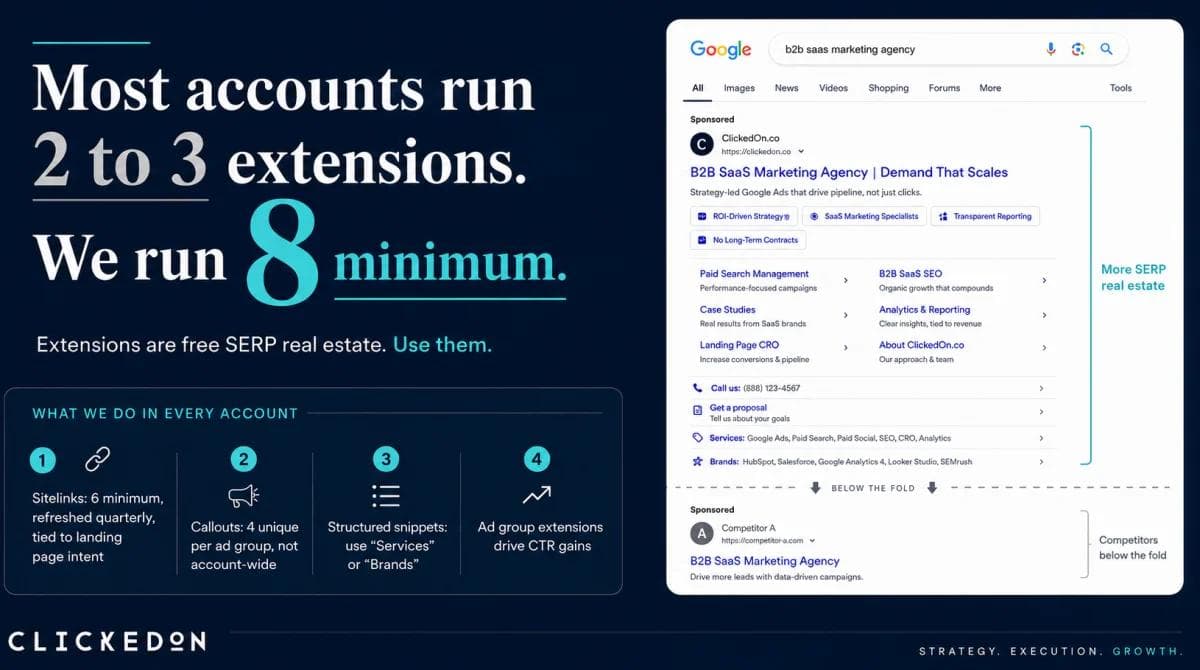
Most Google Ads accounts we audit are running fewer than six asset types. The accounts winning the auction in 2026 are running 12 or more, with business logo, image assets and active promotion assets all live. The gap between those two setups is the difference between an ad that competes and an ad that gets buried below the fold.
If you still call them ad extensions, you are not wrong. Google still understands the term. But the platform, the API, the help docs and the interface have all moved on. So has the asset mix that wins the auction. This is the current playbook.
What changed when Google renamed ad extensions to assets?
In 2022, Google rebranded "extensions" to "assets" across the platform. The functional behaviour is the same. The terminology change reflects a broader shift in how Google thinks about ads: the headline and description are one input among many, and the rest of the ad is built from assets that Google's algorithm assembles in real time based on the query, the device, and the predicted performance.
Three things came with the rebrand.
First, the number of types grew. There are now 19 distinct asset types across account, campaign and ad group level (we cover them in the next section).
Second, brand assets became central. Business name and business logo are no longer optional cosmetic touches. For service businesses, finance, legal, healthcare and higher-consideration B2B, they are part of how Google decides whether an ad looks credible enough to surface.
Third, asset automation expanded. Google now generates sitelinks, callouts and images automatically from your site content. From September 2026, the "automatically created assets" setting is being upgraded to AI Max, which adds AI-generated headlines and descriptions grounded in your landing page content.
If you are still treating ad extensions as a 2019-era afterthought, the gap is widening every quarter.
How many Google Ads assets are there in 2026?
Nineteen, across three broad categories. Navigation and contact assets help users get in touch or to specific pages. Information and offer assets surface selling points and prices. Brand and visual assets put the brand mark and visual content into the ad itself.
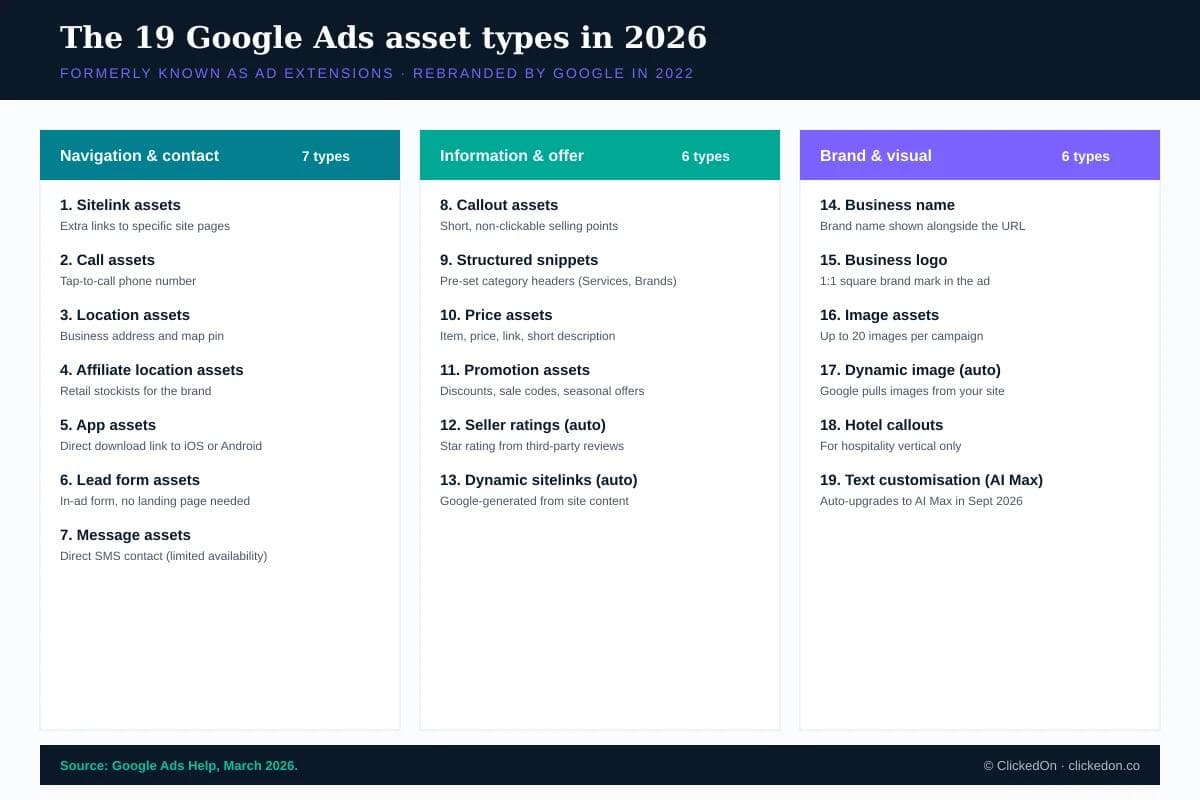
Not every asset is right for every advertiser. A SaaS business has no use for affiliate location assets. A hotel chain has no use for app assets. But every advertiser running Search campaigns should be using assets from the first two categories, and every brand that wants to look like it belongs in the auction should be using assets from the third.
What are the actual benefits of using ad extensions?
Six measurable benefits, in order of impact.
1. Higher click-through rate, at no extra cost. Google's own published guidance puts the average uplift at 10 to 25% across asset types. The mechanism is simple: an ad with sitelinks, callouts and image assets occupies two to three times the vertical space of a text-only ad. More space means more attention. More attention means more clicks.
2. Lower cost per click via better Ad Rank. Ad Rank is calculated using your bid, your Quality Score and the expected impact of formats and assets. When your expected CTR is higher (driven by stronger assets), your Quality Score lifts. When Quality Score lifts, Ad Rank rises at the same bid, which means Google charges you less per click for the same position. In practice we see CPC reductions of 8 to 18% when a previously thin asset setup is brought to a proper Tier 1 stack.
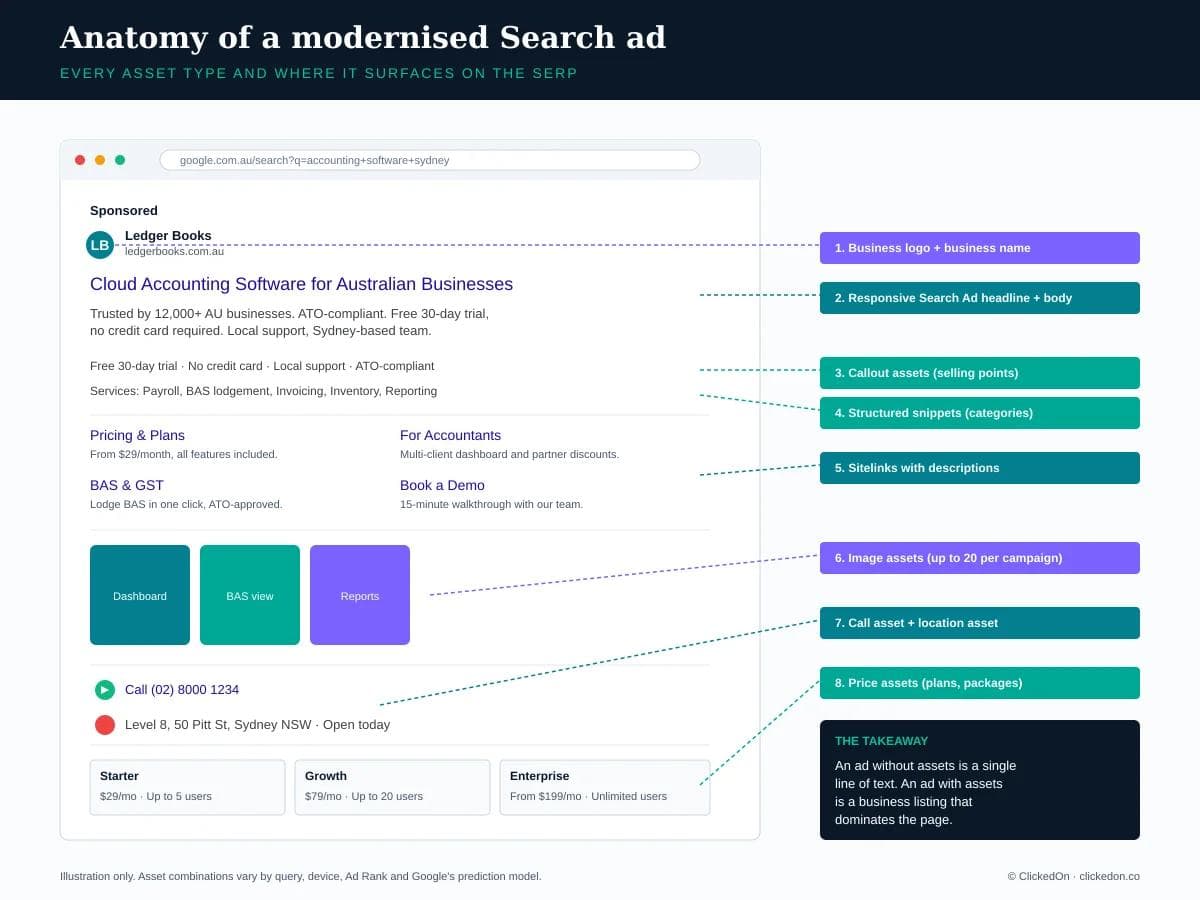
3. More SERP real estate. A standard text ad occupies roughly 90 pixels of vertical space. A modernised ad with sitelinks, image assets, callouts and a structured snippet can occupy 250 to 350 pixels. On mobile, where the screen is smaller, the effect is amplified. Your ad pushes competitors below the fold.
4. Direct conversion paths. Call assets, lead form assets and location assets let users convert without clicking through to the site. For service businesses this is the single biggest reason to run assets. A plumbing business in Manly converts at 4 to 6% on call assets, against 1.5 to 2% on landing page form fills. The friction difference is real.
5. Quality Score signal. Expected CTR is one of three components in Quality Score (with ad relevance and landing page experience). Higher Quality Score means lower CPC, better ad position, and more impressions for the same budget. Strong asset performance feeds directly into Quality Score over time.
6. Brand presence. Business name and logo assets put your brand mark in the ad, alongside the URL. This matters for return rate, for branded queries, and for the share of clicks against generic competitors. In sectors where trust is the bottleneck (finance, legal, healthcare), brand assets do the work that the description copy cannot.
How do ad extensions affect Ad Rank and CPC?
Ad Rank is the formula that decides whether your ad shows, where it shows, and what you pay. The simplified version is:
Ad Rank = Bid × Quality Score × Expected impact of formats and assets
That third multiplier is where assets earn their keep. If two advertisers are bidding the same amount on the same keyword, the one with the stronger asset setup wins the higher position at a lower CPC. This is not theory. It is how the auction works.
What this means in practice: if you are bidding more aggressively to compete on position, the cheaper move is usually to fix your assets first. A full Tier 1 asset setup (sitelinks, callouts, structured snippets, business name) can lift Ad Rank enough that the position you were buying with a $4.50 bid you can hold with $3.80. Across a $20k AUD monthly spend, that is real money. It is the same hygiene-first logic we apply across every account in our performance marketing programme.
Which Google Ads assets should every advertiser have running by default?
Four assets, set up before any spend goes live.
Sitelinks. Six is the working minimum. Each one with a 25-character link text and two 35-character description lines. Point them at pricing, your top three product or service categories, your case studies or testimonials page, and your contact page. Test the description lines; Google will only show sitelinks with descriptions when it predicts they will perform, but when they show, they take up significantly more space.
Callouts. Six to eight short benefit statements, 25 characters or fewer. Avoid repeating your description copy. Avoid generic claims. Strong callouts: "Free 30-day trial", "ATO-compliant", "Sydney-based support", "No credit card required". Weak callouts: "Quality service", "Trusted brand", "Best in industry".
Structured snippets. Pick a header (Services, Brands, Models, Featured hotels) and list three to ten values. These appear inline below the description and are particularly useful for ecommerce and service businesses with clear category structure.
Business name. Set this at the account level. Make sure it matches your brand exactly as it appears in trade. Google will show this alongside the URL on most ad serves in 2026, and an inconsistent or missing business name reads as a setup gap.
If your account is missing any of these four, do nothing else until they are in place.
What about brand assets in 2026? Business name, logo, and image assets
For most of the last decade, Search ads were essentially text only. Brand presence was implied through the URL and reinforced through the description copy. In 2026 that is no longer the default experience.
Business logo. A 1:1 square image, served alongside the business name. Use your primary brand mark, not a tagline lockup. The logo needs to be legible at small sizes (around 32px on mobile). Test the cropping in the preview tool before going live.
Image assets. Up to 20 images per campaign in two aspect ratios: 1:1 square (minimum 300x300px) and 1.91:1 landscape (minimum 600x314px). Real product or service photography beats stock photography by a clear margin in our testing. For ecommerce, use product shots on clean backgrounds. For service businesses, use real-team photography in the work environment. Avoid heavy on-image text; Google rejects anything with more than 20% text coverage.
Why these matter now. In 2026 the SERP is increasingly visual. Image assets compete for the same attention as Shopping cards, Local Pack listings and image-led organic results. A text-only ad in this environment looks like it belongs in 2019. The same shift is reshaping how paid search works alongside AI surfaces, which we cover in how AI search is changing PPC.
Should you opt in to automated assets?
This is where most advertisers either over-trust or under-trust the platform. The correct answer is selective and weekly.
Google generates three kinds of automated assets: dynamic sitelinks (pulled from your site content), dynamic image assets (pulled from your site or product feed), and from September 2026, AI Max text customisation (AI-generated headlines and descriptions grounded in your landing page content).
The case for opting in: Google's published data suggests automated assets lift conversions by around 2% on average. For accounts already running a strong manual stack, that is a free 2%. Worth taking.
The case against: automated assets can be off-brand, factually wrong, or non-compliant. In regulated verticals (finance, health, education) this is a real risk. A health practice we audited last year had an automated callout running for six weeks that said "Walk-in available" when the practice was appointment-only. Patient complaints flagged it before the marketing team did.
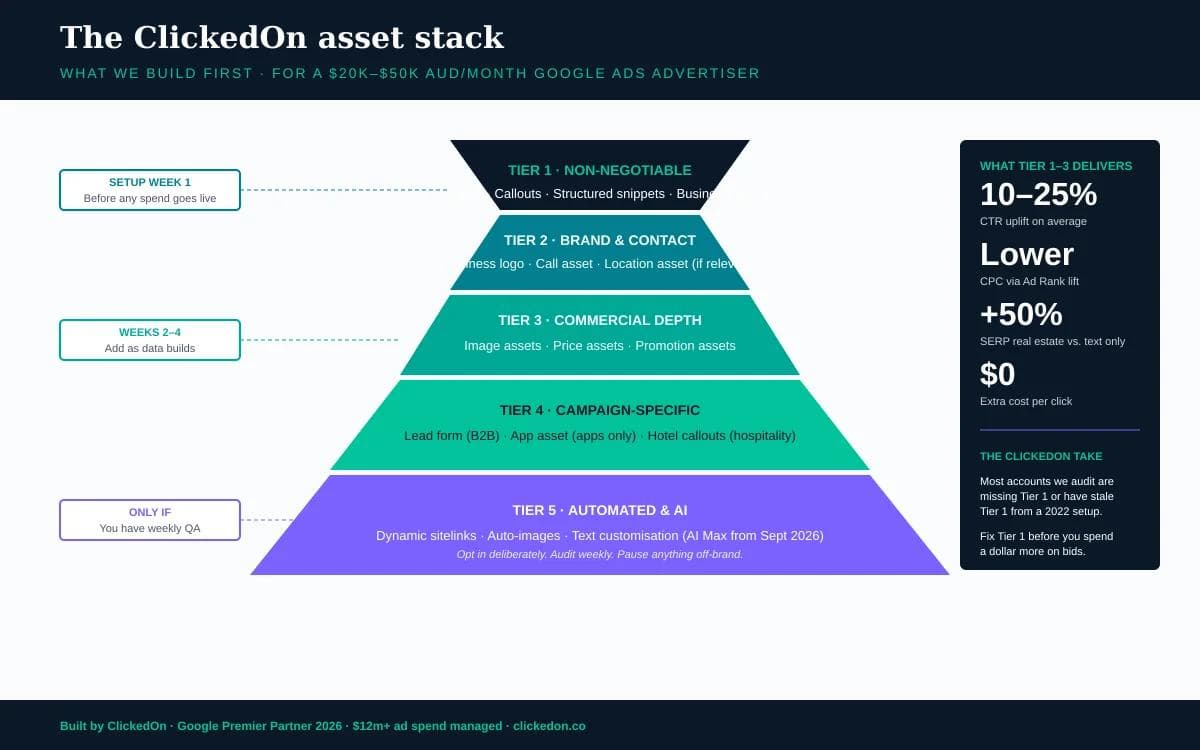
Our position: opt in only if you have a weekly QA process in place to review the automated assets report, pause anything off-brand, and remove anything inaccurate. If no one owns that review, opt out.
What is AI Max and what changes in September 2026?
AI Max is Google's bundled set of AI features for Search campaigns, including text customisation (formerly known as automatically created assets) and Final URL expansion.
The change announced for September 2026: campaigns currently using text customisation will be automatically upgraded to AI Max. Once upgraded, AI Max generates additional headlines and descriptions for your responsive search ads. These are grounded in your landing page content and your existing ad inputs, using a mix of extractive techniques (pulling snippets from page titles, meta descriptions, and page copy) and generative AI.
In theory this expands the relevance of your ads to queries you could not have anticipated. In practice it removes a layer of editorial control.
What to do before September 2026:
- Audit the current automatically created assets report on every campaign.
- Tighten your landing pages, because that is the source content AI Max draws from.
- Decide which campaigns you want AI Max running on (high-volume, lower-risk verticals) and which you want kept manual (regulated, low-volume, brand-sensitive).
- Set up a weekly review cadence for any campaign with AI Max enabled.
This is not a setting to set and forget. The default of opt-in does not relieve you of the responsibility for what runs.
The ClickedOn asset stack for an Australian advertiser
For a typical client spending $20k to $50k AUD per month on Google Ads, here is how we build assets:
Week 1, before launch. Sitelinks (6 with descriptions), callouts (8), structured snippets, business name, business logo. Tier 1 in the priority pyramid above.
Weeks 2 to 4, as data builds. Image assets (10 to 15 to start, focused on the highest-volume campaign), call asset (if relevant), location asset (if relevant), price assets (for SaaS and ecommerce), promotion assets (only if the offer is current).
Month 2 onward, with QA. Selective opt-in to automated assets, with a weekly review built into the team's regular rhythm. Lead form assets where the offer warrants it (free audit, demo, whitepaper download).
The accounts we take on usually have something live in the first half of this list. The job most of the time is finishing the setup, killing stale promotion assets that have been running for 18 months, and rebuilding sitelinks to current landing pages. Asset hygiene pairs closely with the audience targeting work that decides who sees the ad in the first place.
What are the most common mistakes that kill asset performance?
Five mistakes we see in nearly every audit.
- Set and forget. Sitelinks pointing at pages that 404 or redirect. Promotion assets advertising last Easter's offer. Callouts that no longer match the current positioning. Assets need a quarterly review at minimum.
- Sitelinks without descriptions. A sitelink with only the link text takes up about half the visual space of one with two description lines. The descriptions are how you double the SERP footprint of your ad. Adding them takes 30 minutes per campaign.
- Callouts that duplicate the headline. If your headline says "Free 30-day trial", your callout should not. The asset's job is to add information, not repeat it. Audit every campaign for callout-headline overlap.
- Image assets sourced from stock libraries. Generic stock photography signals to Google's quality models that the brand is anonymous. Real photography wins consistently. If you do not have it, this is the highest-ROI photography commission you will run this year.
- No review process for automated assets. Whatever the policy is on automation (opt in, opt out, selective), it needs to be a policy with an owner. The accounts that get burned by an off-brand automated asset are always the ones where no one was watching.
Frequently asked questions
Are ad extensions (assets) free to use?
Yes. Assets do not add a cost per click. You pay only when someone clicks your ad, regardless of whether they click the headline, a sitelink, or a call asset. The call asset is the exception: a call from a mobile ad is charged at the standard CPC.
Are ad extensions still called extensions, or have they been replaced?
The terminology is "assets" in current Google Ads. "Extensions" is the legacy term from before the 2022 rebrand. The features are identical; only the name changed. Most practitioners still use both terms interchangeably in conversation.
Do ad extensions improve Quality Score?
Indirectly, yes. Quality Score is calculated from expected CTR, ad relevance and landing page experience. Strong assets lift expected CTR, which lifts Quality Score over time. Quality Score is not adjusted for the presence of assets in isolation, but the performance lift they deliver feeds back into the system.
How many ad extensions should I use per campaign?
At minimum, four (sitelinks, callouts, structured snippets, business name). For most accounts we run a stack of 8 to 12 asset types, depending on whether call, location, image and price assets are relevant to the business.
Do ad extensions work on Performance Max?
Yes. Assets are supported across Search, Performance Max, Demand Gen and YouTube. Performance Max uses a broader asset library (including video and audio) and lets Google assemble the ad creative dynamically. The principles are the same: more strong assets, better outcomes. Our Performance Max guide covers the format in depth.
Key takeaways
- Google renamed ad extensions to assets in 2022. There are 19 types in 2026.
- Assets lift CTR by 10 to 25% on average, lower CPC via Ad Rank, and add no cost per click.
- The four non-negotiables: sitelinks, callouts, structured snippets, business name.
- Brand assets (logo, business name, image) have moved from optional to default in 2026.
- Automated assets are useful if QA'd weekly, risky if not.
- AI Max auto-upgrade lands September 2026. Decide which campaigns it runs on, and which stay manual, before then.
- Most accounts we audit are missing Tier 1 assets or running stale ones. Fix that before increasing bids.
Where to start
Open your account and count your live asset types. If you are under six, or any of the four Tier 1 assets (sitelinks, callouts, structured snippets, business name) is missing, that is the first job, before any bid change.
ClickedOn is a Google Premier Partner with a four-plus-year average client tenure and $12m+ in managed ad spend. If your asset setup has not been touched since 2023, or you want to know what AI Max is going to do to your account in September, book a free Google Ads audit and we will show you what to fix first, ranked by impact. If you want to read more before you talk to us, the Google Ads management service page walks through how we structure the work.